Cappadocia Balloon GoPro & 4K Video Guide
A GoPro mounted on the basket edge, pointed outward at dozens of balloons rising over fairy chimneys at sunrise—this is the classic Cappadocia balloon video. The footage practically films itself. But the difference between a shaky, overexposed clip and a cinematic sequence comes down to five settings and how you mount the camera.
GoPros are extremely common on Cappadocia balloon flights. Here is what works, what does not, and how to get the best 4K footage from your balloon ride.
Best GoPro Settings for Balloon Flights
These settings work for GoPro Hero 10, 11, 12, and 13. Older models (Hero 8 and 9) use similar menus with slightly different naming.
| Setting | Recommended | Why |
|---|---|---|
| Resolution | 4K (3840 x 2160) | Full detail for the landscape; allows cropping in post without losing quality |
| Frame rate | 30fps | Cinematic look; 60fps only if you plan slow-motion segments |
| Field of view | Wide or Linear | Wide captures the full basket and sky; Linear removes fisheye distortion for a cleaner look |
| Stabilization | HyperSmooth High or Boost | Compensates for basket movement and burner vibrations; Boost crops slightly more |
| Color profile | Natural (or Flat for color grading) | Natural gives accurate sunrise colors out of camera; Flat preserves more detail for post editing |
| White balance | 5500K (locked) | Prevents color shifts as you turn in the basket; auto WB creates inconsistent clips |
| ISO range | 100–800 | Cap at 800 to avoid grainy footage; sunrise light is sufficient above this range |
| Shutter speed | Auto | Let the GoPro handle shutter; manual shutter requires an ND filter for proper exposure |
Mounting Options in the Basket
How you mount the GoPro determines the type of footage you get. Here are four approaches that work well:
1. Chest Mount
The chest mount harness positions the GoPro at mid-torso height, capturing a natural point-of-view angle. It shows the basket edge in the bottom of the frame for context, with the landscape and balloons above. Hands-free, so you can hold champagne or a phone simultaneously. The footage looks stable because your torso absorbs most of the movement.
2. Basket Edge Clamp
A Jaws Flex Clamp (or similar) attached to the basket’s top edge gives you a fixed wide-angle shot of the entire view. This is the “set it and forget it” approach—the GoPro records the full flight in a single continuous shot. Position it on the side facing the majority of other balloons (ask the pilot which direction that will be). Use a safety tether to prevent the clamp from slipping.
3. Short Selfie Stick (30 cm)
A short extension stick lets you hold the GoPro above head height for wide shots that include yourself and the landscape. Keep the stick inside the basket perimeter at all times—do not extend it over the basket wall. The pilot needs clear sightlines, and the burner is directly above. A 30 cm stick is the maximum practical length.
4. Handheld
Simple and effective. Hold the GoPro in one hand, use HyperSmooth stabilization, and pan slowly. The key mistake with handheld: panning too fast. The balloon already rotates in the air current, so let it do the work. Point the camera in one direction and hold still for 10–15 seconds. Then slowly rotate to a new angle. Smooth transitions between angles edit together much better than constant jerky panning.
Battery and Storage Management
- Battery life at 4K/30fps: Roughly 60–75 minutes on a full charge at room temperature. In cold conditions (below 5°C), expect 40–55 minutes. Our flight lasts approximately 60 minutes, so a single full battery covers it—but pack a spare in cold weather to be safe.
- Cold weather tip: Keep the spare battery in your inner jacket pocket against your body. Body heat maintains the charge. Insert the warm battery right before the cold one dies.
- Storage: 4K/30fps consumes approximately 5.5 GB per hour. A 64 GB card gives you roughly 10–11 hours, more than enough. Use a V30-rated microSD card (or faster) to avoid recording drops.
- Format the card the night before. A clean card prevents write errors during the flight. Transfer your existing files to a laptop or hard drive first.
The Five Shots Every Balloon Video Needs
If you want to edit a short video (60–90 seconds) from your flight, capture these five clips:
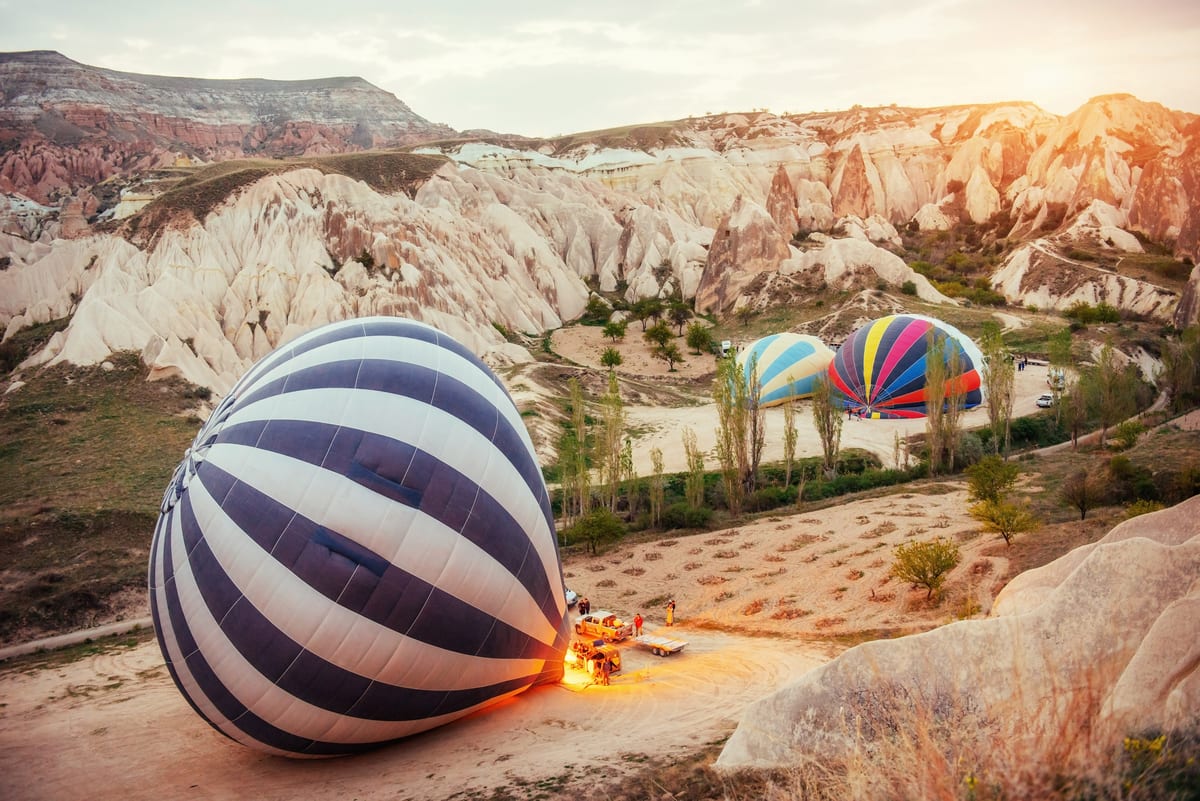
- Inflation: The balloon envelope filling with hot air on the ground. The flame lighting up the fabric from inside against the dark sky. 15–20 seconds.
- Liftoff: The moment the basket leaves the ground. Shoot from inside looking outward as the earth drops away. 10–15 seconds.
- The mass ascent: Dozens of balloons rising around you with the Cappadocia landscape below. Pan slowly 180 degrees. 20–30 seconds.
- The golden moment: When the sun breaks the horizon and everything turns gold. Hold still on the most photogenic angle—usually toward other balloons with fairy chimneys below. 15–20 seconds.
- The landing: Often the basket touching down on the trailer, crew catching the ropes, the champagne being poured, over roughly 15–20 seconds.
Between these five shots, record whatever catches your eye. But having these five in the can guarantees you have the structure for a clean edit.
Phone Video: iPhone and Android Tips
If you are filming on your phone instead of a GoPro, these adjustments make a noticeable difference:
- iPhone: Shoot in 4K/30fps via Settings > Camera. Enable Action Mode for stabilization if you are moving around the basket. Use Cinematic Mode for shallow-depth-of-field shots of your travel companion with balloons behind them.
- Samsung: Use the Pro Video mode. Lock white balance to 5500K. Set resolution to UHD (4K). Enable Super Steady for stabilization.
- Pixel: The standard camera app records 4K/30fps. Use the ultrawide lens for basket-interior shots. Stabilization is applied automatically and works well.
- All phones: Turn on airplane mode before the flight. Notifications buzzing during your sunrise recording ruin audio and cause brief screen interruptions.
Editing Your Balloon Footage
A few editing tips to turn raw clips into something worth sharing:
- Keep it short. 60–90 seconds is the sweet spot for social media. Nobody watches a 10-minute unedited balloon video. Cut to the five key moments.
- Add music carefully. The natural audio—burner roar, silence, wind—is more powerful than most music tracks. Consider starting with natural sound, then fading in music for the golden hour section.
- Stabilize in post. Even with HyperSmooth, some clips benefit from additional stabilization in editing software. DaVinci Resolve (free), Adobe Premiere, and CapCut all have built-in stabilization tools.
- Color grade lightly. The sunrise colors are already dramatic. A slight boost in warmth (increase orange tones 5–10%) and a small contrast increase (10%) is usually all you need. Over-grading makes the footage look unnatural.
- Speed ramp the liftoff. Slow the liftoff moment to 50% speed, then ramp back to 100% as you reach altitude. This technique emphasizes the transition from ground to sky.
Frequently Asked Questions
Can I use a GoPro on a selfie stick during the flight?
Yes, but keep the stick short (30 cm maximum) and inside the basket perimeter. Do not extend it over the basket walls. The pilot needs clear sightlines, and the burner is directly above. A chest mount or clamp is more practical for continuous recording.
Will the GoPro battery last the entire flight?
At 4K/30fps, a GoPro Hero 12 or 13 battery lasts 60–75 minutes in normal temperatures, so a single charge comfortably covers our approximately 60-minute flight. In cold weather (below 5°C), bring a spare battery and keep it warm in your jacket.
Should I use a GoPro or my phone for video?
GoPros are better for wide-angle continuous shots, action-style footage, and mounting on the basket. Phones are better for quick clips, telephoto shots of distant balloons, and switching between photo and video. The ideal setup: mount the GoPro on the basket edge for a continuous wide shot, and use your phone for targeted clips and photos.
Can I fly a drone during the balloon flight?
No. Drones are prohibited in the Cappadocia balloon flight zone by SHGM (Turkish civil aviation authority) regulation. Launching a drone from the basket or from the ground during balloon flights risks confiscation and significant fines. See our drone rules guide for full details.
What is the best resolution for Instagram Reels and TikTok?
Record in 4K/30fps and export in 1080x1920 (9:16 vertical) for Reels and TikTok. The 4K source gives you cropping flexibility in post—you can reframe a wide landscape shot into a vertical format without losing quality. For horizontal YouTube uploads, export in 3840x2160 (16:9).
Related Articles
Cappadocia Balloon Ride from Istanbul: Can You Do It as a Day Trip?
Cappadocia balloon ride from Istanbul as a day trip: flight schedules, costs from EUR 150, hour-by-hour plan, and whether one day is enough. Book with Above Cappadocia.
Cappadocia Balloon, ATV & Valley Hike Combo: The Ultimate Adventure Day
Cappadocia balloon, ATV, and valley hike combo: hour-by-hour adventure day plan with sunrise flight from EUR 150, ATV from EUR 35, and free valley hikes.
Cappadocia Balloon October Weather Guide: What to Expect
Cappadocia balloon October weather: 6-13 C at sunrise, calm, stable weather, autumn colors over fairy chimneys. Flights from EUR 150.
Film Your Sunrise Flight in 4K
Balloon flights from EUR 150 per person with hotel pick-up, a light snack with hot and cold drinks, and champagne. Bring your GoPro, phone, or both—the sky does the rest.